
Note: This site is moving to KnowledgeJump.com. Please reset your bookmark.
Designing eLearning
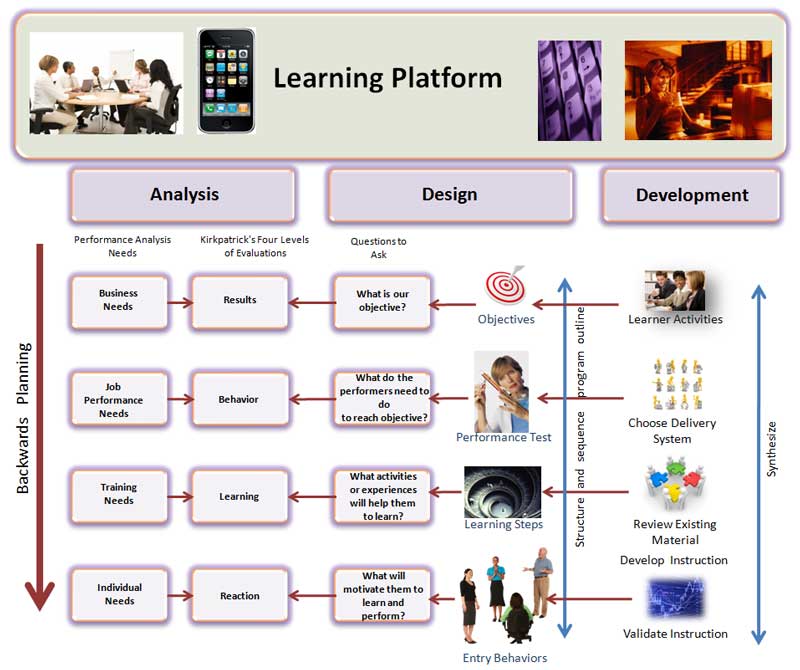
A learning methodology is a set of procedures composed of methods, principles, and rules for enhancing individual capacity and performance.
Yet some designers mainly focus on the technology and content when it comes to building elearning platforms; however, this normally leads to a page-turning design — the learner reads what is on the screen and then clicks the next button. While this can bring about knowledge, which is important, the design often fails to follow-up with the next step — performance — having the learners practice the skills in order to gain experience.
While there are a number of means of achieving a rich and interactive learning platform, one option is using a design architecture composed of the six types of content and the six categories of Bloom's Revised Taxonomy:
Six Types of Content in eLearning
Content normally comes in one of six forms (Clark, Chopeta, 2004; Anderson, Krathwohl, Airasian, Cruikshank, Mayer, Pintrich, Raths, Wittrock, M.C., 2001):
- Fact - unique data (e.g., symbols for Excel formula, or the parts that make up a Learning Objective)
- Concept - a category that includes multiple examples (e.g., Excel formulas, or the various types/theories of Instructional Design)
- Process - a flow of events or activities (e.g., how a spreadsheet works, or the five phases in ADDIE)
- Procedure - step-by-step task (e.g., entering a formula into a spreadsheet, or the steps that should be followed within a phase in ADDIE)
- Strategic Principle - task performed by adapting guidelines (e.g., doing a financial projection in a spreadsheet, or using a framework for designing learning environments)
- Metacognitive – Knowledge of cognition in general, as well as awareness and knowledge of one’s own cognition
Bloom's Revised Taxonomy
Each type of content normally has several degrees of difficulties of learning, depending on how the learners will be expected to use the content. For example, they might have to 1) know about an outside process and how it relates to a process they are involved with, 2) perform a process, and 3) create a new process.
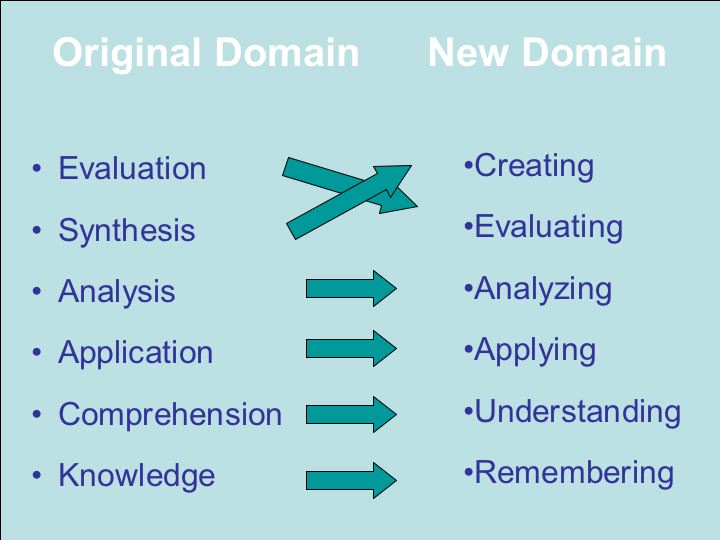
The revised Cognitive Domain of Bloom's Taxonomy provides a good guide for six types of learning (Anderson, Krathwohl, Airasian, Cruikshank, Mayer, Pintrich, Raths, Wittrock, M.C., 2001):
Architecture Design Matrix
Putting the above two concepts in a matrix gives us an idea of what type of activities the learners need to perform in order for them to master the required performance skills. The matrix below lists various instructional options or activities for matching a specific content with a performance level:
| The Knowledge Dimension | Remember | Under-stand | Apply | Analyze | Evaluate | Create |
|---|---|---|---|---|---|---|
| Facts | list | para-phrase | classify | outline | rank | categorize |
| Concepts | recall | explains | show | contrast | criticize | modify |
| Processes | outline | estimate | produce | diagram | defend | design |
| Procedures | reproduce | give an example | relate | identify | critique | plan |
| Principles | state | converts | solve | different-iates | conclude | revise |
| Meta-cognitive | proper use | interpret | discover | infer | predict | actualize |
Note that the activities are not locked in, but are rather suggestions that are aimed at improving the learning platform so that it supports the learners in their quest to master the required objectives.
The activities listed in the matrix can be categorized into four types of Design Architectures (Clark, 2002):
- Receptive: Absorbing the information
- Directive: Performing a required step and then receiving immediate feedback
- Guided Discovery: Opportunities to try, fail, reflective, and then perform to meet the required standard
- Exploratory: Learning how to solve problems on our own
Thus, we normally use the first architecture to learn about something and then move on to one or more of the last three so that we can do something with it.
Thus, the final design of an elearning platform should normally contain the first Design Architecture, Receptive, so that the learners can gain the minimum basic knowledge; in addition to containing one or more of the last three Design Architectures, Directive, Guided Discovery and Exploratory, so that the learners can master the required skills.
Designing eLearning: ADDIE plus More
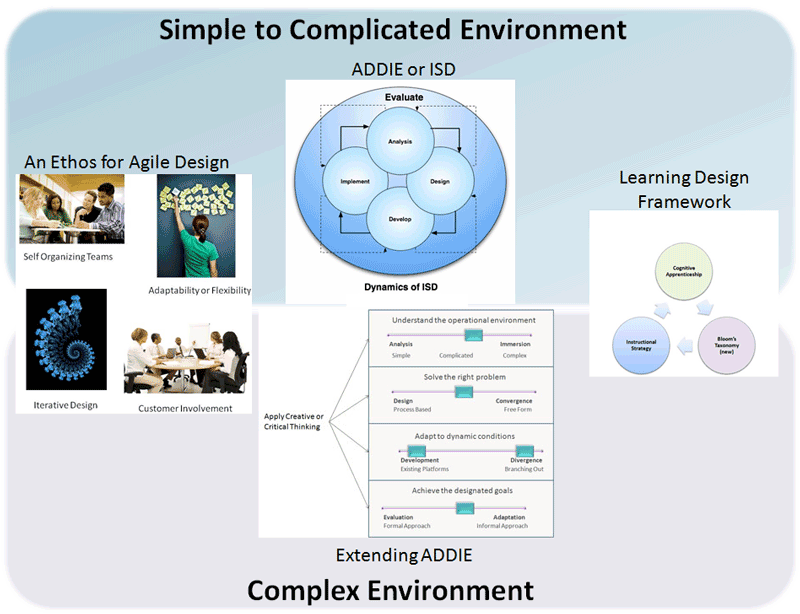
While the ADDIE model is quite useful when it comes to designing effective elearning platforms, the design does require extra attention as compared to classroom platforms. Unlike classrooms where instructors can adapt to the learners' needs; elearning platforms must be designed to take care of the learners' needs, unless they are synchronous. Note that elearning is often divided into two types, asynchronous and synchronous:
- Asynchronous - The participants (learners and instructors) are not online at the same time. This type of instruction is often referred to as self-paced learning. Its main advantage is that the learners can learn at their own pace.
- Synchronous - The learners interact with each other and their instructors in real time (virtual classroom). This is quite similar to classroom learning, except the participants are separated by space or distance. Its main advantage is that it brings the social aspect to learning.
Since each of the two types of elearning have their advantage, good designers often combine self-paced learning with either synchronous elearning or classroom learning. This hybrid method is normally called blended learning.
Another effective method is to build an asynchronous elearning platform supported by social media tools. Note that a learning platform implies an architecture or framework that is stably structured so that it supports the learners.
Thus, social learning is juxtaposed to it with media tools, such as Twitter, Facebook, blogs, and wikis that allow the learners to communicate with their peers, instructors, experts, etc. While these types of social medial are not quite as synchronous as face-to-face or live on-line chats as they are normally not real time, they do create a close approximation if they are supported properly.
Next Steps
-
Designing eLearning
Related Resources

References
Anderson, L.W., Krathwohl, D.R., Airasian, P.W., Cruikshank, K.A., Mayer, R.E., Pintrich, P.R., Raths, J., Wittrock, M.C. (2001). A Taxonomy for Learning, Teaching, and Assessing: A revision of Bloom's Taxonomy of Educational Objectives. New York: Pearson, Allyn & Bacon.
Clark, R.C. (2002). The new ISD: Applying cognitive strategies to instructional design. Performance Improvement, v. 41, n. 7. pp.8-14.
Clark, R., Chopeta, L. (2004). Graphics for Learning : Proven Guidelines for Planning, Designing, and Evaluating Visuals in Training Materials . San Francisco: Jossey-Bass/Pfeiffer.
Clark, R.C., Mayer, R.E. (2007). eLearning and the Science of Instruction. San Francisco: Pfeiffer.
Quinones, M.A., Ehrenstein, A. (1997). Training for a Rapidly Changing Workplace: Applications of Psychological Research. Washington, D.C.: American Psychological Association.